
Find Us Our Location
- Plot no.1, Gali No.1, Gemini park, Nangli Sakrawati Najafgarh, New Delhi 110043
- [email protected]
- +91-9810765783

Industrial PCs (IPCs) are the backbone of modern manufacturing facilities, automation systems, process industries, and production plants. Unlike conventional computers, industrial PCs operate in demanding environments where they are exposed to dust, heat, vibration, moisture, and continuous operation. When these systems fail, production downtime can lead to significant financial losses.
This is where Industrial PC Repairing becomes crucial. A properly repaired and maintained industrial PC ensures uninterrupted operations, improved productivity, and extended equipment lifespan. Whether you are a maintenance engineer, plant manager, automation professional, or business owner, understanding industrial PC repair and maintenance can help reduce downtime and improve operational efficiency.
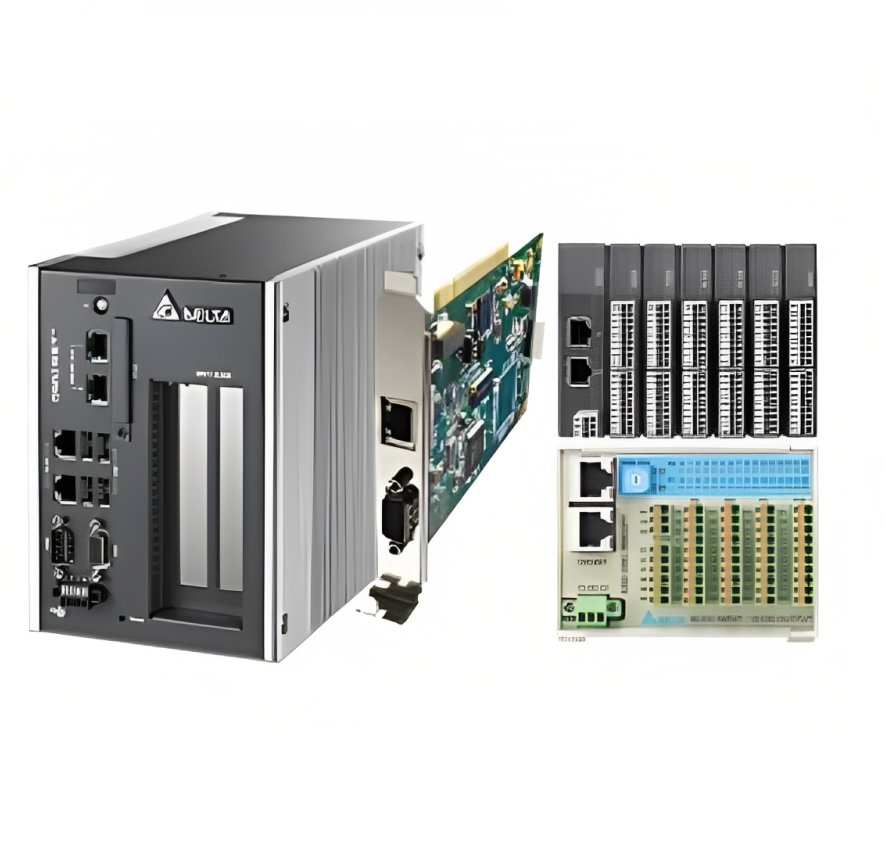
Industrial PC Repairing refers to the diagnosis, troubleshooting, repair, testing, and maintenance of industrial-grade computer systems used in manufacturing and automation environments.
Industrial PCs are designed to control and monitor:
• PLC-based automation systems
• SCADA applications
• HMI systems
• CNC machines
• Robotics systems
• Production lines
• Process control systems
• Industrial IoT applications
Repairing these systems involves identifying hardware or software faults and restoring the equipment to optimal operating condition.
Industrial PCs often run critical applications that directly impact production processes. Even a minor fault can result in:
• Production delays
• Equipment shutdowns
• Data loss
• Quality control issues
• Increased maintenance costs
• Reduced productivity
Professional Industrial PC Repairing helps organizations:
Quick diagnosis and repair reduce machine stoppages and production interruptions.
Repairing industrial computers is often more cost-effective than replacing them.
Well-maintained systems perform consistently and reliably.
Timely repairs prevent major failures that require expensive replacements.
Repair services help preserve important production and operational data.
Understanding common industrial computer issues is the first step toward effective troubleshooting.
Power supply units are among the most frequently damaged components in industrial PCs.
Symptoms
• PC does not start
• Sudden shutdowns
• Intermittent power loss
• System rebooting unexpectedly
Possible Causes
• Voltage fluctuations
• Aging components
• Overheating
• Power surges
The motherboard connects all major components of the industrial computer.
Symptoms
• No display
• Failure to boot
• Random freezing
• Peripheral communication issues
Common Causes
• Electrical damage
• Component aging
• Excessive heat
• Moisture exposure
Storage devices store critical operating systems and industrial applications.
Symptoms
• Slow performance
• Boot errors
• Missing files
• Data corruption
Causes
• Wear and tear
• Mechanical damage
• Power interruptions
• Excessive vibration
Industrial PCs often operate continuously in harsh environments.
Symptoms
• Overheating
• Unexpected shutdowns
• Reduced performance
• Fan noise
Causes
• Dust accumulation
• Failed cooling fans
• Blocked ventilation
• High ambient temperatures
Many industrial PCs are integrated with touchscreens and operator interfaces.
Symptoms
• Blank screen
• Touchscreen malfunction
• Flickering display
• Dead pixels
Causes
• LCD damage
• Cable faults
• Backlight failure
• Touch controller problems
Industrial systems rely heavily on communication interfaces.
Common Ports
• Ethernet
• USB
• RS232
• RS485
• CAN Bus
• Profibus
Symptoms
• Device communication loss
• Network failures
• Data transmission errors
Industrial PCs often run specialized software environments.
Symptoms
• Boot failures
• Blue screen errors
• Application crashes
• Slow performance
Causes
• Malware
• Corrupted files
• Improper shutdowns
• Storage device failure
Successful Industrial PC Repairing begins with a systematic troubleshooting approach.
Start by examining the system for obvious signs of damage.
Check for:
• Burn marks
• Loose connectors
• Dust buildup
• Corroded components
• Damaged cables
Visual inspection often reveals issues that can be resolved quickly.
Power-related problems are among the most common industrial PC failures.
Test:
• Input voltage
• Power supply output
• Fuses
• Power connectors
• UPS systems
Using a multimeter helps identify voltage irregularities.
Most industrial PCs provide diagnostic indicators.
Observe:
• Power LEDs
• Status lights
• Error codes
• Alarm indicators
• Beep sequences
These indicators provide valuable clues about underlying issues.
Evaluate individual hardware modules.
Check:
• RAM
• Processor
• Storage devices
• Motherboard
• Expansion cards
Replacing suspect components one at a time can isolate faults effectively.
If hardware appears functional, investigate software-related problems.
Review:
• Operating system logs
• Event viewer reports
• Application errors
• Driver conflicts
• Security issues
Software diagnostics often reveal hidden system faults.
After repairs, conduct comprehensive testing.
Verify:
• System startup
• Communication ports
• Network connectivity
• Application performance
• Input/output operations
Testing ensures complete restoration of functionality.
Professional Industrial PC Repairing requires specialized diagnostic tools.
• Digital multimeter
• Oscilloscope
• Power supply tester
• Thermal camera
• Logic analyzer
• Soldering station
• Diagnostic software
• Memory testing utilities
• Hard drive health monitoring tools
• Network analyzers
• Backup software
• Compressed air
• Anti-static brushes
• Isopropyl alcohol
• ESD-safe cleaning tools
Proper tools improve repair accuracy and reduce troubleshooting time.
Different repair methods are used depending on the nature of the fault.
This involves repairing individual electronic components.
Examples:
• Capacitor replacement
• IC replacement
• Voltage regulator repair
• Connector replacement
Benefits include lower repair costs and preservation of original equipment.
Board-level repair focuses on restoring damaged circuit boards.
Common repairs include:
• Motherboard repair
• Communication card repair
• Display controller repair
• Interface board repair
This approach is particularly useful when replacement boards are unavailable.
Data recovery is often a critical aspect of Industrial PC Repairing.
Services may include:
• SSD recovery
• Hard disk cloning
• Operating system restoration
• Database recovery
Protecting production data is a top priority during repairs.
Industrial touchscreen systems are widely used in automation.
Repair services may include:
• LCD replacement
• Touch panel calibration
• Backlight replacement
• Display cable repair
These repairs restore operator interface functionality.
Preventive maintenance significantly reduces the need for emergency repairs.
Dust is one of the biggest threats to industrial computer reliability.
Recommended actions:
• Clean cooling fans
• Remove dust from vents
• Inspect filters
• Clean internal components
Cleaning should be performed according to environmental conditions.
Excessive heat shortens component lifespan.
Monitor:
• CPU temperature
• Motherboard temperature
• SSD temperature
• Ambient temperature
Maintaining proper cooling improves reliability.
Industrial PCs require stable power.
Use:
• UPS systems
• Surge protection devices
• Voltage stabilizers
• Power conditioning equipment
These measures prevent electrical damage.
Regular software updates enhance performance and security.
Maintain:
• Operating systems
• Drivers
• Firmware
• Security patches
Keeping software updated reduces unexpected failures.
Data protection is essential for industrial operations.
Implement:
• Automated backups
• Cloud backups
• Local backup servers
• Recovery testing
Backup strategies minimize data loss risks.
Early detection prevents major system failures.
Watch for:
Repeated crashes often indicate hardware or software issues.
Sudden performance degradation should not be ignored.
Excessive temperatures can permanently damage components.
Grinding or clicking sounds may indicate storage device failure.
Loss of connectivity can disrupt automation systems.
Boot problems require immediate investigation.
Prompt Industrial PC Repairing helps prevent catastrophic failures.
Many industrial computer issues require specialized expertise.
Professional repair services offer:
Experts use sophisticated tools to identify hidden faults.
Experienced technicians can resolve issues quickly.
Specialized repair providers often stock obsolete industrial components.
Repairing equipment is typically more economical than replacement.
Professional repairs ensure long-term system stability.
Many organizations struggle with deciding whether to repair or replace industrial computers.
• Hardware is still supported
• Damage is limited
• Replacement costs are high
• Spare parts are available
• Downtime must be minimized
• Obsolete technology
• Extensive hardware damage
• Frequent recurring failures
• Incompatible software requirements
A professional evaluation helps determine the most cost-effective solution.
Industrial computer repair services are essential across various sectors.
Production lines rely heavily on industrial computers.
Automation systems require reliable industrial computing.
Process control systems demand continuous operation.
Industrial PCs manage packaging and production processes.
Remote monitoring systems depend on rugged computing platforms.
Industrial computers support critical infrastructure operations.
Automated handling systems require uninterrupted computer functionality.
Selecting a qualified repair partner is critical.
Consider the following factors:
Look for extensive experience in industrial automation systems.
Advanced testing equipment improves repair accuracy.
Access to spare parts reduces repair times.
A warranty demonstrates confidence in repair quality.
Choose providers familiar with your specific industry requirements.
Reliable support ensures ongoing assistance when needed.
At Advance Automation, we understand how critical industrial computers are to your operations. Our experienced engineers specialize in diagnosing, repairing, testing, and maintaining a wide range of industrial PC systems used across manufacturing and automation industries.
Our Industrial PC Repairing services include:
• Industrial motherboard repair
• Industrial computer troubleshooting
• Industrial touchscreen repair
• Data recovery solutions
• Power supply repair
• Communication card repair
• Preventive maintenance services
• Component-level repairs
• Emergency breakdown support
• Performance optimization
With advanced diagnostic tools, experienced technicians, and a commitment to quality, Advance Automation helps businesses reduce downtime and maximize equipment reliability.
To maximize system lifespan:
1. Schedule regular preventive maintenance.
2. Maintain clean operating environments.
3. Monitor temperature continuously.
4. Use surge protection devices.
5. Replace aging cooling fans proactively.
6. Keep software updated.
7. Perform routine data backups.
8. Inspect cables and connectors regularly.
9. Monitor storage device health.
10. Address minor issues before they become major failures.
These practices significantly improve industrial computer reliability and reduce repair costs.
Industrial PC Repairing is an essential service for industries that rely on automation, process control, and continuous production operations. Industrial computers operate in demanding environments and are exposed to numerous factors that can lead to hardware and software failures. A structured approach to troubleshooting, repair, and preventive maintenance helps organizations minimize downtime, extend equipment lifespan, and reduce operational costs.
From power supply failures and motherboard issues to storage device problems and communication errors, understanding common industrial PC faults enables faster diagnosis and effective repair. Regular maintenance, proactive monitoring, and professional repair services ensure long-term system reliability and performance.
Advance Automation provides comprehensive Industrial PC Repairing solutions designed to keep your critical industrial systems operating efficiently. Whether you need troubleshooting, component-level repair, preventive maintenance, or emergency support, partnering with experienced professionals ensures your industrial computers remain productive, reliable, and ready to meet the demands of modern industry.
FAQs
1. What is Industrial PC Repairing?
Industrial PC Repairing is the process of diagnosing, troubleshooting, repairing, and maintaining industrial computers used in manufacturing, automation, SCADA systems, PLC controls, CNC machines, and other industrial applications. It helps restore system functionality, reduce downtime, and extend equipment lifespan.
2. What are the most common Industrial PC failures?
The most common Industrial PC failures include power supply issues, motherboard damage, hard drive or SSD failures, overheating, touchscreen malfunctions, communication port failures, memory (RAM) faults, and operating system corruption. Regular maintenance can help prevent many of these problems.
3. How can I identify if my Industrial PC needs repair?
Signs that an Industrial PC requires repair include frequent system crashes, slow performance, startup failures, overheating, unexpected shutdowns, communication errors, touchscreen issues, unusual noises from storage devices, and recurring software errors.
4. Why is Industrial PC Repairing important for manufacturing plants?
Industrial PCs often control critical production processes. Timely Industrial PC Repairing helps minimize production downtime, improve operational efficiency, prevent data loss, reduce maintenance costs, and ensure uninterrupted automation system performance.
5. Is it better to repair or replace an Industrial PC?
In many cases, repairing an Industrial PC is more cost-effective than replacing it, especially when the hardware is still supported and spare parts are available. Replacement may be recommended for obsolete systems, severe hardware damage, or repeated failures that impact productivity.
6. What is included in a professional Industrial PC Repairing service?
A professional Industrial PC Repairing service typically includes fault diagnosis, component-level repair, motherboard repair, power supply repair, data recovery, touchscreen repair, software troubleshooting, communication port testing, system calibration, and performance verification.
7. How often should Industrial PCs undergo preventive maintenance?
Industrial PCs should ideally undergo preventive maintenance every 3 to 6 months, depending on environmental conditions and operating hours. Facilities with high dust, heat, vibration, or continuous operation may require more frequent inspections and cleaning.
8. Can data be recovered from a failed Industrial PC?
Yes, in many cases data can be recovered from failed industrial hard drives or SSDs. Professional Industrial PC Repairing services often include data recovery, drive cloning, operating system restoration, and backup solutions to protect critical production information.
9. What causes Industrial PCs to overheat?
Industrial PCs commonly overheat due to dust accumulation, blocked ventilation, failed cooling fans, high ambient temperatures, inadequate airflow, or prolonged continuous operation. Overheating can damage internal components and lead to unexpected system failures.
10. How can businesses extend the lifespan of Industrial PCs?
Businesses can extend Industrial PC lifespan by performing regular preventive maintenance, cleaning cooling systems, monitoring temperatures, using surge protection devices, updating software and firmware, backing up data regularly, and addressing minor issues before they become major failures.